Hermes on Synology: my 24/7 AI assistant
I wanted a personal AI assistant that is always on, that I can talk to from my phone, and that knows who I am without me re-explaining my career every time. A chatbot in a browser tab does not do that. An agent running on my own hardware, reachable from a messaging app, does.
I started with OpenClaw and then moved to Hermes Agent from Nous Research. Two things brought me over: how easy it is to install, and its ability to learn on its own. Hermes builds up notes and skills from what it does, and in my experience that autonomous learning goes further than what I got with OpenClaw. That is a personal impression, not a benchmark. For a source-level comparison, OpenClaw's own documentation has a page called OpenClaw and Hermes Agent, and it is worth reading before you pick a side.
Why a NAS and not a Mac mini?
The default answer for an always-on home agent is a Mac mini. It is a great machine, and it is very efficient, so electricity is not my argument. My reasons are different:
- It is already on, 24/7. My Synology DS723+ runs all day anyway. The agent is one more container, not one more device.
- Isolation. The agent lives in a container, as an unprivileged user, and sees only the two folders I mount into it. My laptop, my browser sessions and my password manager are nowhere near it.
- Storage that is already protected. The agent's memory, skills and sessions sit on the same volume as the rest of my data, with the same snapshots and backups.
- No local inference needed. The NAS does not run the model. Inference happens at a cloud-based AI API provider, so a modest NAS CPU is enough, and I can choose the model.
The trade-off is that whatever the agent reads is sent to the cloud AI provider as model input, and whatever it writes in the chat goes through Telegram. I come back to that in the lessons below.
The setup in one picture
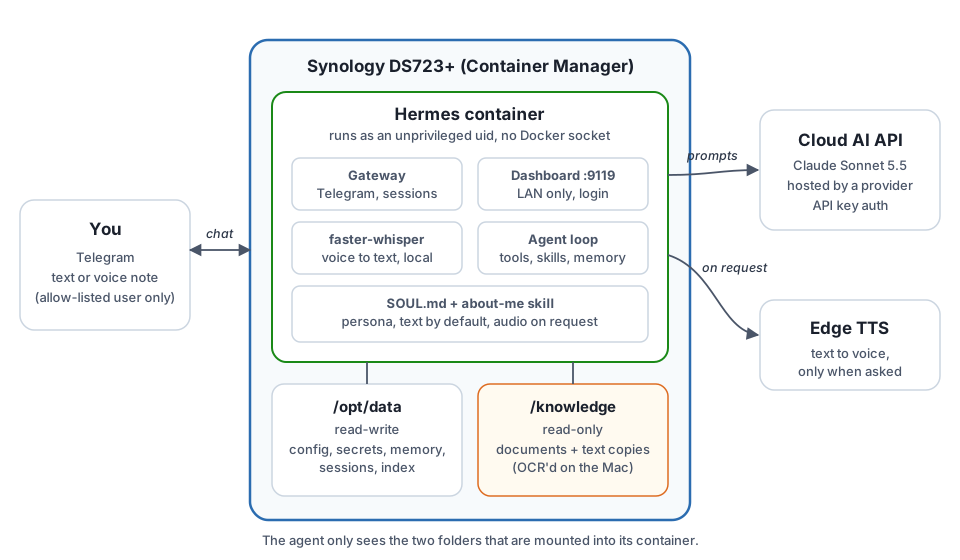
- Telegram is the interface, by text or by voice note. A user allow-list means only my account can talk to the bot, and the bot cannot be added to groups.
- Hermes runs through Docker Compose in Synology's Container Manager. It has a web dashboard, reachable only from my local network and protected by a login.
- The model is Claude, served by a cloud-based AI API provider, with a dedicated API key that I can revoke independently of everything else.
- Voice in is transcribed on the NAS with faster-whisper. Voice out uses a text-to-speech tool, only when I ask for it.
- My knowledge base is mounted read-only. The agent can read my documents but cannot modify or delete them.
How I built it
The official Docker guide gets you most of the way. The high-level steps were:
- Prepare the credentials: a dedicated API key from the AI provider, a Telegram bot from BotFather (with group joining disabled), and my Telegram user ID for the allow-list.
- Create three folders on the NAS: one for Hermes' data (read-write), one for my documents (read-only), one for the Compose file.
- Write the Compose file and the
.envthat holds the secrets, withchmod 600on the latter. - Seed the configuration: model and region, speech-to-text, text-to-speech, and a
SOUL.mdfile that defines the assistant's personality: concise, in my language, text by default, audio only when I ask. - Start the project from Container Manager and run
hermes doctorto verify. - Build the knowledge base and let the agent index it (more on that below).
I did not write all of this by hand. I let an AI coding assistant draft the Compose file, the configuration and the step-by-step guide, and I checked every step against the real system. That second part matters more than it sounds, as the lessons below show. If you want to do the same, this is the prompt I would start from:
A reusable prompt to get started
Paste it into your coding assistant, fill in the brackets, and review everything it produces before you run it.
I want to deploy Hermes Agent (Nous Research) on a Synology [MODEL] running
DSM [VERSION], using Container Manager and Docker Compose.

Requirements:
- LLM: [cloud AI API provider], model [ID], region [REGION], API-key auth.
- Interface: Telegram bot, text and voice notes, restricted to my user ID.
  The bot must not be usable in groups.
- Voice notes are transcribed locally. Replies are text by default and
  audio only when I explicitly ask.
- A personal knowledge base of my documents, mounted READ-ONLY.
- Security: run as an unprivileged user (NOT my admin account), no Docker
  socket, dashboard reachable from the LAN only and password-protected,
  secrets only in a chmod 600 .env file.

Deliver:
1. compose.yaml and .env.example
2. config.yaml and a SOUL.md that sets the assistant's style
3. A step-by-step guide using the Container Manager UI, with an SSH fallback
4. A verification checklist (hermes doctor plus text and voice tests)

Rules: read the official Hermes documentation first and cite it. Mark every
assumption you could not verify, and tell me which test will confirm it.
Never put real secrets in any file.
Giving it a memory: the knowledge base
An assistant that does not know me is just a chatbot with a Telegram skin. Hermes does have a built-in memory, but it is tiny: a couple of thousand characters, injected into every prompt. That is enough for "prefers short answers, speaks English and French", not for a career.
So I split it in two. A short profile goes into the built-in memory. Everything else lives in a read-only
folder of about a hundred of my own documents (CV, diplomas, certifications, achievements), plus a plain-text
copy of each one and an index file. A small about-me skill tells the agent to read the profile
first, then the index, then only the documents it needs.
I built that folder on my Mac before copying it to the NAS. The surprise: nearly half of the documents were scans with no text layer at all. A PDF that looks readable to you is just a picture to the agent. I ran them through Apple's Vision OCR on the Mac, so the agent reads text instead of guessing from pixels, and it flags anything that came from OCR as "verify".
Talking to it
Text works as you would expect. Voice is where it gets fun. I send a voice note, the NAS transcribes it locally, and Hermes answers in text. When I add "reply with audio", it answers with a voice bubble, and that works very well.
Transcription is not perfect: it does not always recognize my accent. What I like is that it rarely matters.
Hermes has the context of the previous messages, so it usually fixes the mistake by itself. And since my
SOUL.md tells it to state its assumption when something looks odd, the errors are visible
instead of silent.
What I learned
- Verify what the AI generates. My assistant's first Compose file had a CPU limit that the Synology kernel does not support, and the container refused to start. It had also guessed the user ID the agent should run as. Both were plausible, and both were wrong for my system. The guide it wrote flagged its own assumptions, which is exactly why I knew what to test.
- Do not run the agent as your admin account. I used a dedicated numeric user ID with no account behind it, gave it ownership of the data folder only, and mounted my documents read-only. If the agent ever misbehaves, the blast radius is two folders.
- Memory needs a design. Dumping documents into a tiny built-in memory does not work. Short profile in memory, details in files, an index in between.
- Check your documents before you trust them. The OCR surprise would have turned into confident but wrong answers about my own diplomas.
- Not every warning matters.
hermes doctorprints several that are harmless with a cloud API provider. It also suggests runninghermes setup, which would rewrite my configuration, so I did not. - Be clear about where your data goes. Whatever the agent reads is sent to the cloud AI provider as
model input, and the provider documents its data-protection terms for that. Whatever it writes in the chat passes
through Telegram, which is not end-to-end encrypted for bots. The same goes for spoken replies: the text-to-speech
service I use is an online one, so the text of an audio reply leaves the NAS too. My
SOUL.mdtells it not to paste sensitive data such as ID numbers, grades or phone numbers unless I explicitly ask. - Pick one way to manage the stack. Container Manager's UI or SSH, not both. Two ways of editing the same project make it hard to know which configuration is actually running.
Conclusion
I now have an assistant running on a NAS that was already on 24/7. I reach it from my phone by text or voice, and it knows my background because I gave it a structured, read-only knowledge base rather than a blind copy of my files. Getting there took a few wrong guesses from my AI coding assistant and some care about permissions.
It is also a starting point. I plan to extend it skill by skill, giving it one new capability at a time, each with the least access it needs. That is the real reason I like this setup: when the agent can only see what I mount and only act as an unprivileged user, adding a capability is a decision, not a leap of faith.
If you try it, start with the prompt above, and test everything it tells you ;-)